
The Techjoomla Blog

Stay updated with all the latest happenings at Techjoomla. From news about the developments in your favourite extensions to Tips & Tricks about the Joomla CMS, Framework & Development.

Automating multiple extension translation management using the Transifex client and a shell script

Automating-multiple-extension-translation-management-using-the-Transifex-client-and-a-shell-script

We've been using Transifex for more than a year now, and quite happy with the way crowdsourcing can help enrich the reach of your extensions. However, updating all the resources for all the extensions was a painful task and something everyone wanted to avoid. The tx-client eases some pain by allowing easy pushes & pulls of source files & translations. However, the tx-client relies on a 'config' file to be updated with all the resource slugs. With so many extensions and also with so many plugin language files getting added regularly, it's a tough task to keep on updating the config file.


Continue reading
0
  21473 Hits

JBolo 3.0 beta 1 is here for Testing & it's free to download!

JBolo-3.0-beta-1-is-her_20180618-131433_1

JBolo Beta 1 with Group Chat is here!  This version brings most awaited group chat feature to current JBolo. This blog will give you a quick overview of what to expect from JBolo 3.0 beta release. There's this & plenty more under the hood including an API based architecture which will allow us to release mobile apps for JBolo in the near future.

Continue reading
3
  11712 Hits

Sneak peek at the upcoming JBolo 3.0 dashboard

Sneak-peek-at-the-upcoming-JBolo-3.0-dashboard

Check out new dashboard for upcoming JBolo 3.0 that will be supporting group chat! 

0
  6285 Hits

Zoo - Creating an address field element

Zoo-Creating-an-address-field-element

Here's a short tutorial on creating a Zoo element that has multiple sub-fields. A good example for the same, which we've also used as a sample is an address field. An address field will typically have different parts such as city, zip, state etc. I assume you have already gone through the zoo documentation on creating a new custom element - http://...

Continue reading
3
  19079 Hits

Developing with Zoo - Programmatically creating "Edit Item" links for Zoo CCK

Development-with-Zoo


Zoo - Techjoomla Blog to programativally insert links, Techjoomla.com

Zoo from the YooTheme guys is a pretty awesome CCK for Joomla with some mind-blowing features. Whats more, they have made it extremely easy to use for the end user. It can be easily scaled to handle all kinds of content management situations that you might encounter.

It's so flexible, in fact.. that we have used it for Variety of applications using Shopping Carts (with Quick2Cart Integration), Online Product Catalogs, Download Managers, Business directories & what not

Continue reading
3
  16809 Hits

Rolling out CSS/JavaScript changes with heavy browser caching

Rolling-out-CSS2FJavaScript-changes-with-heavy-browser-caching

Most of us have been in this scenario. We have spent hours tweaking our Joomla site using numerous tools like Google Page Speed, YSlow and made those adjustments to shelve those important milliseconds from page load times. You've added gzip, Joomla caching and also enabled month long caching via the .htaccess file. The site now works fast. Cool!

Continue reading
3
  9336 Hits

Search.. the way LinkedIn does

Search-The-way-Linkedin-does

I think all of us admire the User Experience improvements all of the social networks are continuously doing. Facebook keeps pushing these tiny things and so does LinkedIn. One thing that LinkedIn has had probably from day 1 is the fantastic search. You can choose what to search - People/Companies/Jobs etc

Continue reading
0
  13550 Hits

Invalid Token Errors in Joomla 1.5.X & 1.6.X

Invalid-Token-Errors-in-Joomla-1.5.X--1.6.X

Invalid Tokens- I had been seeing this error on & off on some of the sites we were building both in Joomla 1.5 & 1.6. This error has caused a silent but significant furor on the Forums. Not just at Joomla.org but on the sites of quite a few Template & extension Developers as well. In this Blog, I hope to finally lay the question of why this error occurs to rest.

Continue reading
1
  52683 Hits

Joomla Day Malaysia a big success!

Joomla-Day-Malaysia

Hey there, Malaysia! We want to take this opportunity to congratulate you on organizing such an amazing Joomla Day! We really enjoyed it there. A special thanks to the Joomla Day Organising team & the folks at JomSocial for their superb hospitality. Meriza, Azrul, Irwan, Fuqaha & the gang - Keep it up, guys! Joomla Day Malaysia 2011 was an ...

Continue reading
0
  9999 Hits

Techjoomla- The Road to Joomla 1.6

Techjoomla-The-Road-to-Joomla-1.6

Hey All,

All of you have been asking us about where we stand on Joomla 1.6 compatibility so I thought its time we give you an update of the status.

Continue reading
0
  9294 Hits

Syndicated: 5 Fantastic years with Joomla. A nostalgic look back...

5-Fantastic-Years-With-Joomla

Today, on the 1st of September 5 years ago Joomla was unveiled to the world for the first time. It's time for celebrations for the Joomla community worldwide which is one of the most diverse communities in the Open Source world. With the least entry barriers, where anyone can come in & take leadership & make change happen. It is this marvelous community of users, developers, designers, documentation creators, bug reporters & fixers, evangelists & every single person that has touched & been touched by this piece of software.

Continue reading
1
  9311 Hits

How to Copy Zoo Items programmatically

How-to-Copy-Zoo-Items-programmatically

In our last Post in the Zoo series, we looked at deleting records programmatically. Copying zoo item is not as easy as deleting records. You should have all the details including the zoo category of the zoo item which you want to copy. First, you should have all data of a zoo record. We have used the item API which gives zoo item's data & getRelatedCategoryIds which tells the relation of a zoo item to the categories.

Let's get the zoo records data first

Continue reading
3
  9604 Hits

Programatically delete Zoo items

Programatically-delete-Zoo-items

While developing a custom frontend for Authors to manage their own content, we needed to let them delete their own items. The Quick & Dirty way of doing this is by executing some delete queries on zoo related tables. But that's not the right & elegant way to do it.

The right way is to use the Zoo API & do this in 3-4 lines of code against 20-30 lines of the dirty code.

Continue reading
3
  8412 Hits

Rendering Zoo Records flexibly - Example with Record lists

Rendering-Zoo-Records-flexibly

Rendering a List view of Zoo items using Code


Zoo is one of the most versatile CCK extensions available in Joomla. It's flexible & at the same time easy to use for end users. In spite of these positive points, there are times when you have to dive into development & Zoo APIs to develop your own custom views.

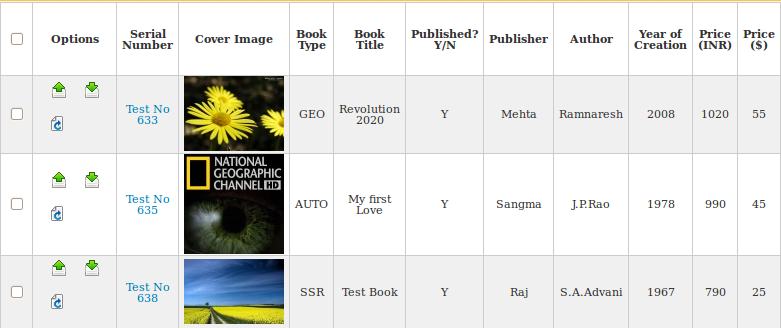
In this particular case, we wanted to develop a List/Grid view with Zoo ( of a particular Content Type)  which showed all Zoo attributes in a table view for easier data viewing on the frontend for content managers. In this blog, we will tell you just how to go about doing that

Continue reading
4
  11844 Hits

Zoo CSV Import with automatic field mapping

Zoo-CSV-Import-with-automatic-field-mapping

Zoo is one of the best CCK extensions available for Joomla. It's a flexible and powerful application builder to manage your content. Especially if you are having huge data sets, Zoo can be an awesome way to manage & present it all. However with large data sets, manually adding all the data might not be practical. This is where the inbuilt Zoo import tool can help you in a big way.

In this blog, we will show you how it works & also how we solve a problem that it presents if you have data with lots & lots of fields. When this happens during the import you need to manually Map the fields in your Import CSV/JSON file to the fields in Zoo so that the import can proceed. However when you have lots of fields it a huge chore to map them all manually. However, with our solution, you can do it in a single Click! 

Lets how the existing Zoo Data Import Works ( Just in case you didn't know ! ) 

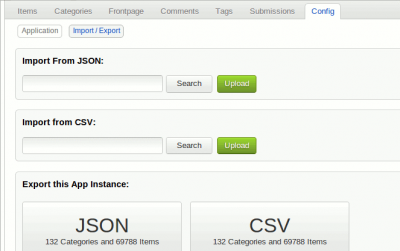
Data import done in following 3 stages. Zoo allows you to import data in JSON or CSV format. 

1. Upload CSV/JSON file.

b2ap3_thumbnail_oie_2582216XM8f3drV.png

Continue reading
4
  22483 Hits